


Home > MonitorSwitch > Overview
MonitorSwitch
MonitorSwitch®, Quickly move windows between monitors |
||
Moving windows is a common task on multi-monitor systems, and MonitorSwitch makes it easier and more efficient. |
||
| MonitorSwitch adds two custom buttons in the caption bar of any windows, allowing you to move the window to the next or previous monitor. | . 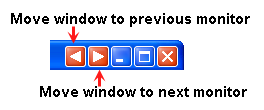 |
|
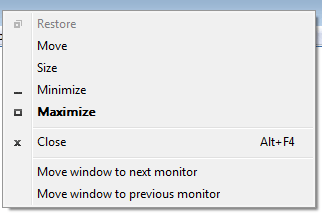 |
MonitorSwitch also adds custom menu commands to the window (or system) menu of applications that lets you quickly move windows between monitors.
|
|
| MonitorSwitch is provided as freeware for only personal (non-business) and non-profit educational use. In these cases, you are granted the right to use this program free of charge. However, if you want to support the development of my freeware, you are welcome to make a donation via PayPal. |
||
| Click the button below to make a donation using your credit card via PayPal in US dollars: | ||
| Otherwise, you need to pay for a license for commercial use. GET A LICENSE! | ||

What's New
Version 1.0.7 ( - CURRENT VERSION - ) (Release date: 2010-8-17)
|
Version 1.0.5 (Release date: 2010-7-4)
|
Version 1.0.4 (Release date: 2010-6-15)
|
Version 1.0.3 (Release date: 2010-4-30)
|
Version 1.0.2
|
Screenshots
| MonitorSwitch | Adds custom buttons in the caption bar |
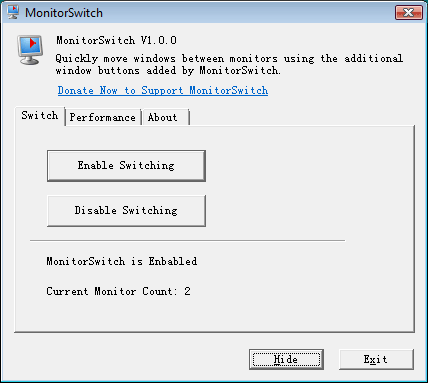 (click for a larger version) |
|
| Adds custom menu to the windows | |
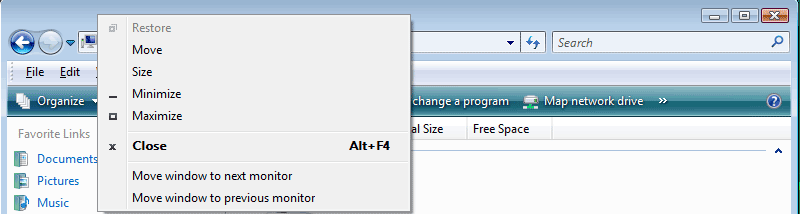 (click for a larger version) |
|